Most Efficient Job Search Automation Tools for International and Senior Candidates to Consider
In this post:
In this post:
Section
Job searching is hard, but for a senior professional or an international candidate, it's a different problem entirely.
The market is noisier than ever. According to a recent Harvard Business Review analysis, AI has turned hiring into "a noisy, crowded arms race of automation". It’s exhausting and inaccurate for everyone. Recruiters are harder to reach, competition is global, and the standard advice, like apply more, optimize your LinkedIn, cast a wider net, was never written for candidates dealing with sponsorship constraints, cross-border hiring norms, or a talent pool where experience narrows your options as often as it opens them.
The answer is to stop doing the wrong things at scale.
This guide is about the most efficient job search automation tools for those who have senior expertise and look for new opportunities in different countries. The mentioned here solutions can help you get there by freeing up your time for the work that matters.
Why the Most Efficient Job Search Automation Tools Work Differently for International Seniors
Most job search advice is written for someone earlier in their career. Apply widely, move fast, optimize for volume. At the senior level, that logic does not hold. If you have been trying to make it work, you know why.
When a recruiter or hiring manager evaluates a senior candidate, they try to gauge the scope of operations, leadership credibility, and whether this person has navigated the complexity the role demands. Assessment at this level is more nuanced, touching on global mobility, change management track record, and business context. A generic application does not answer such questions.
If you are also searching across borders, there is a second layer of screening that has nothing to do with your experience or your fit.
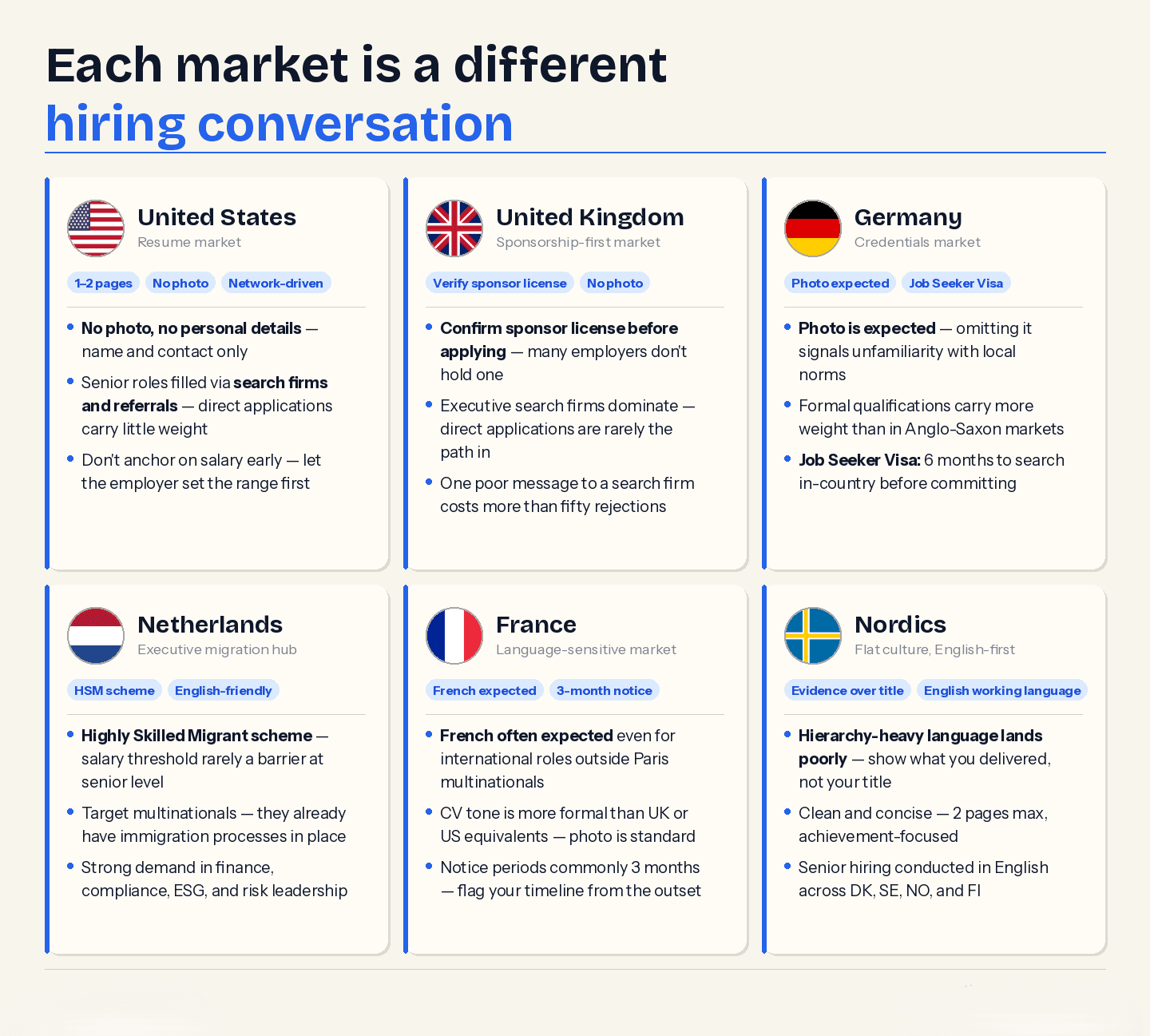
United States
Resume, not CV, one to two pages maximum, no photo or personal details beyond name and contact.
Senior roles are filled through network and search firm relationships; direct applications carry less weight at the executive level.
Compensation framing is negotiation-driven; stating expectations too early can disadvantage you.
United Kingdom
Employers must hold an active sponsor license to hire internationally. Verify this before applying.
The CV format is standard: 2 pages; personal details beyond contact information are not expected.
Executive search firms carry significant weight; direct applications to senior roles are less common than on the continent.
Germany
A professional photo is standard and expected on a CV; omitting it can read as unfamiliar with local norms.
Formal qualifications and certifications carry more weight than in Anglo-Saxon markets.
A Job Seeker Visa allows a six-month stay to search for work. This is useful for candidates who want to conduct in-person interviews before committing to relocation.
Netherlands
Companies operating internationally tend to have established HR immigration processes, making sponsorship more straightforward. Targeting multinationals and EU headquarters is a more efficient strategy than applying broadly.
The Dutch Highly Skilled Migrant programme simplifies sponsorship for roles above a minimum salary threshold, which at the senior level is rarely a barrier.
English is widely used as a working language; Dutch language skills are not typically required at the executive level.
France
A photo is standard; CVs tend to be more formal in structure and tone than UK or US equivalents.
Fluency in French is expected even for international roles, particularly outside Paris-based multinationals.
Notice periods are long (3+ months), which should be factored into your timeline and communicated clearly.
Nordics (Denmark, Sweden, Norway, Finland)
CV formats are clean and concise; two pages maximum, minimal design, achievement-focused.
A flat organizational culture means leadership claims need to be supported differently. Hierarchy-heavy language can land poorly.
English is broadly accepted as a working language; most senior hiring is conducted in this language.
The Most Efficient Job Search Automation Tools Cover These Tasks
The cleanest way to think about automation is through the lens of risk. Low-stakes, repeatable, and research-heavy tasks are safe to delegate to tools. Anything that shapes how you are perceived (e.g., positioning, tone, judgment calls) is not.
Automate the tasks where speed and consistency matter and where a mistake costs you nothing but time:
Job discovery and alerting. Use automation to watch for job titles, target companies, regions, and hiring activity. This is where job alerts and saved searches are useful, as they help compress monitoring effort without sacrificing quality.
Company filtering. Create filters for geography, title scope, language requirements, industry, hybrid vs. remote, and compensation floor.
Sponsorship signals. Automate the first pass. Look for official sponsorship listings, if available, and employer-sponsored relocation and visa information on the company’s careers page. In the UK, the licensed sponsor register is a useful first pass, but it’s just that.
First-pass tailoring. Use AI tools to extract keywords, compare your resume against the job, and identify missing words. CareerSwift, Jobscan, Teal, and Huntr all offer tools for resume tailoring and tracking.
Application tracking. This is one of the safest and highest-return applications of automation. Some tools strongly encourage the use of tracking jobs, documents, stages, and follow-ups in a single place.
Interview prep research. Use AI to research annual reports, product introductions, executive changes, market trends, and interview question possibilities. Again, speed assistance rather than judgment calls.
What Should Remain a Human Effort
These are the areas where automation creates more risk than it removes:
Executive positioning. Your value prop, executive, and market story should not be generated through any form of AI prompt.
Career narrative. The reasoning behind career decisions, promotions, industries, and international mobility should remain a human effort.
Compensation framing. The cross-border executive compensation context cannot be easily automated.
Relocation rationale. The reasoning behind the country of choice, the timing of the move, the employer of choice, and the role of choice should not be generated by any form of AI prompt.
High-value outreach. Any outreach to search firms, executive sponsors, hiring managers, and referral sources should never be written in a manner that suggests an automated tool.
Search firm communication. For executive searches, one poorly written message can have far greater consequences than fifty rejected applications.
A Workable Automation Process for Senior International Job Seekers
A common mistake is starting with tools. A job seeker finds a promising Chrome extension or AI assistant, builds their workflow around it, and ends up optimizing a process that was never properly aimed at to begin with.
The right order is strategy first, filters second, automation third. Tools should serve a decision you have already.
Determine countries, job scope, and compensation floor
Start by thinking about constraints instead of enthusiasm. Limit your search to a maximum of three major markets at a time. Determine job families, levels, industry adjacency, compensation floors, and whether you are searching for relocation, sponsorship, or remote work from abroad. This is to prevent tools from expanding your search beyond commercially viable options.
Filter by visa sponsorship and employer profiles
Create a list of employers that are most likely to hire internationally. In Europe, EURES is a useful resource for broad cross-border job searching. In the UK, the sponsor register is a validation layer. Specialized websites like Visa Sponsor Jobs and Relocate.me can help you discover employers that already indicate visa sponsorship or relocation friendliness, especially in the tech sector or internationally mobile positions.
Localize your resume, LinkedIn, and job messages by market
This is where most international job seekers undermine their credibility. A great resume format doesn’t necessarily translate well into other markets. Neither does a generic “global executive” summary. Automation can help you identify gaps in job titles and keywords. However, manual work is necessary to adapt your resume structure, tone, and emphasis to the market.
Configure smart job alerts and company watchlists
Job alerts should be configured by title, geography, and company cluster. Configure company watchlists by employers who are strategically important and operationally viable to hire internationally. Be selective: ten great employers are better than one hundred vague employers.
Tailor selectively instead of mechanically
Automation can help you identify gaps in job titles, hard skills, phrasing, and specific vocabulary. Manual work is necessary to ensure that your resume doesn’t sound like a compliance exercise but like a credible operator. Here, CareerSwift can help. It covers keyword optimization, ATS integration, and resume optimization to help senior and international job seekers.
Where Automation Creates Risks for Senior and International Candidates
Automation fails senior and international candidates in predictable ways. Knowing them in advance is cheaper than learning this mid-search.
Mass application behavior. Applying broadly and quickly reads as indiscriminate at the senior level. It generates noise, dilutes fit signals, and can damage a professional reputation in markets where hiring networks are smaller than they appear. As both sides of the hiring process become more automated, the result has been more volume and less signal for everyone involved.
Generic AI-written outreach. Experienced recruiters and search professionals recognize templated language immediately. At the senior level, how you write is part of how you are assessed. A message that could have been sent by anyone signals that it probably was.
Market localization errors. A globally polished CV is not a locally appropriate one. Format expectations, document length, leadership evidence, and even the language used to describe seniority vary between the UK, Germany, the Netherlands, France, and the Nordics. Ignoring this does read as unprepared.
Factual drift. Heavy AI use in senior content introduces minor errors, such as team sizes, revenue figures, dates, geographies, and business scope. At the executive level, these are not minor inaccuracies. They are credibility gaps that surface at precisely the wrong moment.
Reputational signals. LinkedIn's recent moves toward recruiter verification reflect a broader market concern about trust and authenticity. Professional reputation is becoming more machine-readable while also being scrutinized more closely by machines. Senior candidates operating with an automated footprint should take this seriously.
5 Most Efficient Job Search Automation Tools for Senior and International Candidates in 2026
The tools below were chosen because each one does a specific job well without pushing you toward volume, generic output, or loss of control over your own positioning. All of them protect your time so you have more time for the work that matters.
CareerSwift: Best for end-to-end search management
CareerSwift covers the full search workflow in a single platform: resume building, cover letter generation, LinkedIn scoring, AI interview preparation, and application tracking.
The key distinction for senior candidates is that it is built around guided automation rather than blind submission. You configure the filters and review what goes out. The Chrome extension integrates directly with job boards, pulling listings into one workspace without triggering auto-apply behavior.
Pricing is straightforward: a free Basic plan with all-time access covers the core toolkit. The Standard plan runs €9.99/week or €25/month and removes the main usage limits. A Premium tier aimed at senior professionals (including 50 templates, unlimited LinkedIn scoring, and 20 hours/week of interview practice.
Jobscan: Best for ATS alignment before submitting to roles that matter
Jobscan reverse-engineers the parsing logic of the ATS systems most large employers use (e.g., Taleo, Greenhouse, iCIMS, Lever, and Workday) and scores your resume against a specific job description across 30+ parameters, including keyword density, formatting compliance, word count, and measurable results. It identifies which ATS a target company is likely to use and tailors feedback accordingly.
The standout feature for senior candidates is the LinkedIn optimizer, which runs 25+ checks across headline, summary, work experience, skills, and education. It also flags keyword gaps against real job descriptions. One-Click Optimize (premium) uses AI to rewrite bullets, with an accept/reject flow for each suggestion so you retain control over voice and accuracy. The match score is not a guarantee of ATS passage, but the directional feedback is reliable. Five free scans per month; paid plans from $29.98/month on a quarterly basis.
Teal: Best for structured tracking across a multi-market search
Teal treats a job search like a project. It provides a centralized dashboard, multiple resume versions, contact management, follow-up reminders, and status tracking across every application. The Chrome extension pulls bookmarks from 50+ job boards in one click, bringing the full job description into your workspace so you can view roles and resumes side by side when tailoring.
The built-in networking CRM lets you track contacts at target companies alongside the relevant applications. This can be useful for candidates who are managing a search firm relationship, an internal referral, and a direct application at the same company simultaneously. One limitation worth flagging: Teal has acknowledged in its own user responses that international job search and resume features are not yet fully developed. For US-market applications, it is highly capable; for cross-border searches, use it for tracking and tailoring rather than job discovery. Free core features; Teal+ from $29/month.
LinkedIn Recruiter Lite: Best for identifying who is making the hiring decision
At the senior level, the most valuable automation is intelligence. LinkedIn Recruiter Lite inverts the platform: instead of presenting yourself to the algorithm and waiting, you use recruiter-level search filters to identify hiring managers, internal champions, and search firm contacts at target companies by function, seniority, geography, and company. You can see who has recently changed roles, who is hiring, and who is second-degree connected through your existing network.
Combined with Sales Navigator for more granular company and contact filtering, it turns LinkedIn from a passive job board into a proactive targeting tool. Recruiter Lite from approximately $170/month; Sales Navigator from $99/month.
Hunter.io: Best for direct contact without going through the ATS
Once you have identified the right person, Hunter finds their professional email address with a confidence score and a source citation. It also verifies whether an address is deliverable before you use it. For a senior candidate conducting targeted outreach to ten carefully chosen contacts, this removes the friction of finding contact details and keeps you out of the generic application portal.
Hunter also surfaces other verified contacts at the same domain, useful when your first point of contact is not the right one. Free for up to 25 searches per month; paid plans from $49/month for 500 searches.
Tools side-by-side comparison
Each tool solves a different part of the search. The table below shows where each one fits, what it does not do, and what it costs.
CareerSwift | Jobscan | Teal | LinkedIn Recruiter Lite | Hunter.io | |
Primary use | Full search workflow | ATS alignment | Search tracking and organization | Decision-maker identification | Direct contact finding |
Resume builder | Yes, ATS-optimized | Yes, ATS-focused | Yes, tailored per role | No | No |
Cover letter | Yes | Yes | Yes | No | No |
ATS scoring | Yes | Yes, deep, system-specific | Yes, keyword matching | No | No |
LinkedIn optimizer | Yes, score + tips | Yes, 25+ checks | No | N/A | No |
Job tracker | Yes | Yes | Yes | No | No |
Interview prep | Yes, AI practice | No | No | No | No |
Contact intelligence | No | No | Yes, networking CRM | Yes, recruiter-level search | Yes, email finder |
Auto-apply | 1-click, reviewed | No | No | No | No |
International scope | Yes | Partial | Limited (US-focused) | Yes | Yes |
Free tier | Yes, full access | 5 scans/month | Yes, core features | No | 25 searches/month |
Paid pricing | €9.99/week · €25/month | $29.98/month (quarterly) | $29/month | ~$170/month | From $49/month |
How to Evaluate the Most Efficient Job Search Automation Tools as a Senior or International Candidate
Not every AI tool that claims to support senior or international job seekers does. Most are built around high volume, domestic market, and early to mid-career. Before committing to any tool, evaluate it against these eight factors.
Country and market scope. Most tools are built for the US market and retrofitted for others. Evaluate whether the tool covers your target countries (job sources, employer data, and local hiring norms) or whether international coverage is superficial.
Sponsorship identification. A tool that surfaces roles without flagging visa and relocation support saves you very little time. Check whether sponsorship eligibility is clearly identified within search results, or whether you will still need to verify it separately for every opportunity.
Quality of personalization. There is a difference between polished and accurate output. A tool that produces well-written but generic content creates a different kind of problem at the senior level. Look for tools that personalize against your actual career context, not just your job title and keywords.
Support for senior-level roles. Volume-oriented tools are calibrated for the behavior of most users, not for someone making a selective search. Check whether the tool consistently surfaces roles at the correct seniority level, and whether its application logic reflects that.
Identification of recruiters and hiring managers. The most valuable automation for senior candidates is intelligence. Does the tool help you identify the right people and support credible, targeted outreach? Or does it stop at the job listing?
Workflow steps and review processes. Better tools include a human review step before anything is submitted or sent. Treat the absence of this as a warning sign.
Privacy and data handling. You are uploading sensitive material: career history, compensation data, and, in some cases, strategic or organizational context. Check where that data is stored, how it is used, and whether it is shared with third parties or used to train models.
Pricing relative to search duration. A six-month international search has different economics than a short local one. Evaluate whether the pricing model reflects that, and whether you are paying for features that are only relevant to high-volume, entry-level searches.
Conclusion
The job search market has automated itself into a trust problem. Employers filter harder because candidates apply more. Candidates apply more because tools make it easy. The result is a system that is simultaneously faster and less accurate than it was five years ago.
For senior and international candidates, the exit from that cycle is a deliberate automation strategy. The technology described in this guide makes your search easier by removing the work that should never have been yours to begin with: tracking, formatting, research, and administrative drag. What remains is your positioning, judgment, and the quality of the conversations you have with the right people.
That is why platforms like CareerSwift deserve attention. They’re built around the idea that a senior candidate should stay in control of what goes out and to whom. Start with CareerSwift for free.
FAQs
Is it safe for executives to use AI to write their resumes?
For technical tasks, such as identifying keyword gaps, optimizing for ATS, structuring bullet points, etc, yes. For generating your core career narrative or value proposition, no. At the senior level, hiring managers are assessing leadership credibility, change management experience, and business judgment. AI compresses these distinctions into generic corporate language. Use it as an editor.
How do international candidates efficiently find employers willing to sponsor visas?
Reverse-engineer the search rather than mass-applying and hoping. The information you need requires knowing where to look.
Verify sponsorship eligibility before applying:
In the UK, check the Register of Licensed Sponsors. It’s a public government database updated monthly. If a company is not on it, they cannot legally hire you without first obtaining a license, which adds months to the process.
In the Netherlands, the IND publishes a list of recognised sponsors for the Highly Skilled Migrant programme. Target these companies specifically.
In Germany, no equivalent public register exists, but companies with dedicated global mobility or international HR functions are a reliable proxy for sponsorship capability.
Target the right type of employer:
Multinationals with EU or regional headquarters. They have an existing immigration infrastructure and process international hires regularly.
Companies that have hired internationally in the past 12 months. Check LinkedIn for employees in your target role who relocated from abroad.
Avoid SMEs unless they are in sectors with documented talent shortages. The administrative cost of sponsorship is a genuine barrier for smaller organisations
Use the right job boards:
Relocate.me — lists roles where relocation support is confirmed upfront.
EuropeRemotely and Landing.Jobs — filter by visa sponsorship availability.
LinkedIn — filter by "On-site" in your target city and reach out to the hiring manager directly to confirm sponsorship before applying.
Before any application, confirm three things:
Does the employer hold an active sponsor license or recognised sponsor status in the target country?
Has the company sponsored a visa in the last 24 months?
Is the salary for the role above the relevant threshold? E.g., €5,688/month in the Netherlands, the Skilled Worker salary minimum in the UK.
Does a globally optimized resume work across all markets?
No. A global resume is a myth. Anti-discrimination laws in the US and UK mean that including a photo or personal details can work against you. In Germany and France, omitting a professional photo signals unfamiliarity with local business norms. Format, tone, length, and what constitutes evidence of seniority all vary by market. Localize before you submit.
Why do standard job search tools underperform at the senior level?
Many automation tools are built for volume, speed, and entry- to mid-level ATS parsing. Senior hiring runs on network relationships, executive search firms, and precise market positioning. High-volume tools strip the nuanced context from a senior candidate's experience, making them read as indiscriminate.
What is the right way to contact an executive recruiter or hiring manager?
The message itself should always be manual. You can use intelligence tools to find a verified email address or identify the right decision-maker. But the outreach should be specific: a brief, direct connection between your leadership track record and the company's current situation. A templated message at this level is a reputational signal.
Job searching is hard, but for a senior professional or an international candidate, it's a different problem entirely.
The market is noisier than ever. According to a recent Harvard Business Review analysis, AI has turned hiring into "a noisy, crowded arms race of automation". It’s exhausting and inaccurate for everyone. Recruiters are harder to reach, competition is global, and the standard advice, like apply more, optimize your LinkedIn, cast a wider net, was never written for candidates dealing with sponsorship constraints, cross-border hiring norms, or a talent pool where experience narrows your options as often as it opens them.
The answer is to stop doing the wrong things at scale.
This guide is about the most efficient job search automation tools for those who have senior expertise and look for new opportunities in different countries. The mentioned here solutions can help you get there by freeing up your time for the work that matters.
Why the Most Efficient Job Search Automation Tools Work Differently for International Seniors
Most job search advice is written for someone earlier in their career. Apply widely, move fast, optimize for volume. At the senior level, that logic does not hold. If you have been trying to make it work, you know why.
When a recruiter or hiring manager evaluates a senior candidate, they try to gauge the scope of operations, leadership credibility, and whether this person has navigated the complexity the role demands. Assessment at this level is more nuanced, touching on global mobility, change management track record, and business context. A generic application does not answer such questions.
If you are also searching across borders, there is a second layer of screening that has nothing to do with your experience or your fit.
United States
Resume, not CV, one to two pages maximum, no photo or personal details beyond name and contact.
Senior roles are filled through network and search firm relationships; direct applications carry less weight at the executive level.
Compensation framing is negotiation-driven; stating expectations too early can disadvantage you.
United Kingdom
Employers must hold an active sponsor license to hire internationally. Verify this before applying.
The CV format is standard: 2 pages; personal details beyond contact information are not expected.
Executive search firms carry significant weight; direct applications to senior roles are less common than on the continent.
Germany
A professional photo is standard and expected on a CV; omitting it can read as unfamiliar with local norms.
Formal qualifications and certifications carry more weight than in Anglo-Saxon markets.
A Job Seeker Visa allows a six-month stay to search for work. This is useful for candidates who want to conduct in-person interviews before committing to relocation.
Netherlands
Companies operating internationally tend to have established HR immigration processes, making sponsorship more straightforward. Targeting multinationals and EU headquarters is a more efficient strategy than applying broadly.
The Dutch Highly Skilled Migrant programme simplifies sponsorship for roles above a minimum salary threshold, which at the senior level is rarely a barrier.
English is widely used as a working language; Dutch language skills are not typically required at the executive level.
France
A photo is standard; CVs tend to be more formal in structure and tone than UK or US equivalents.
Fluency in French is expected even for international roles, particularly outside Paris-based multinationals.
Notice periods are long (3+ months), which should be factored into your timeline and communicated clearly.
Nordics (Denmark, Sweden, Norway, Finland)
CV formats are clean and concise; two pages maximum, minimal design, achievement-focused.
A flat organizational culture means leadership claims need to be supported differently. Hierarchy-heavy language can land poorly.
English is broadly accepted as a working language; most senior hiring is conducted in this language.
The Most Efficient Job Search Automation Tools Cover These Tasks
The cleanest way to think about automation is through the lens of risk. Low-stakes, repeatable, and research-heavy tasks are safe to delegate to tools. Anything that shapes how you are perceived (e.g., positioning, tone, judgment calls) is not.
Automate the tasks where speed and consistency matter and where a mistake costs you nothing but time:
Job discovery and alerting. Use automation to watch for job titles, target companies, regions, and hiring activity. This is where job alerts and saved searches are useful, as they help compress monitoring effort without sacrificing quality.
Company filtering. Create filters for geography, title scope, language requirements, industry, hybrid vs. remote, and compensation floor.
Sponsorship signals. Automate the first pass. Look for official sponsorship listings, if available, and employer-sponsored relocation and visa information on the company’s careers page. In the UK, the licensed sponsor register is a useful first pass, but it’s just that.
First-pass tailoring. Use AI tools to extract keywords, compare your resume against the job, and identify missing words. CareerSwift, Jobscan, Teal, and Huntr all offer tools for resume tailoring and tracking.
Application tracking. This is one of the safest and highest-return applications of automation. Some tools strongly encourage the use of tracking jobs, documents, stages, and follow-ups in a single place.
Interview prep research. Use AI to research annual reports, product introductions, executive changes, market trends, and interview question possibilities. Again, speed assistance rather than judgment calls.
What Should Remain a Human Effort
These are the areas where automation creates more risk than it removes:
Executive positioning. Your value prop, executive, and market story should not be generated through any form of AI prompt.
Career narrative. The reasoning behind career decisions, promotions, industries, and international mobility should remain a human effort.
Compensation framing. The cross-border executive compensation context cannot be easily automated.
Relocation rationale. The reasoning behind the country of choice, the timing of the move, the employer of choice, and the role of choice should not be generated by any form of AI prompt.
High-value outreach. Any outreach to search firms, executive sponsors, hiring managers, and referral sources should never be written in a manner that suggests an automated tool.
Search firm communication. For executive searches, one poorly written message can have far greater consequences than fifty rejected applications.
A Workable Automation Process for Senior International Job Seekers
A common mistake is starting with tools. A job seeker finds a promising Chrome extension or AI assistant, builds their workflow around it, and ends up optimizing a process that was never properly aimed at to begin with.
The right order is strategy first, filters second, automation third. Tools should serve a decision you have already.
Determine countries, job scope, and compensation floor
Start by thinking about constraints instead of enthusiasm. Limit your search to a maximum of three major markets at a time. Determine job families, levels, industry adjacency, compensation floors, and whether you are searching for relocation, sponsorship, or remote work from abroad. This is to prevent tools from expanding your search beyond commercially viable options.
Filter by visa sponsorship and employer profiles
Create a list of employers that are most likely to hire internationally. In Europe, EURES is a useful resource for broad cross-border job searching. In the UK, the sponsor register is a validation layer. Specialized websites like Visa Sponsor Jobs and Relocate.me can help you discover employers that already indicate visa sponsorship or relocation friendliness, especially in the tech sector or internationally mobile positions.
Localize your resume, LinkedIn, and job messages by market
This is where most international job seekers undermine their credibility. A great resume format doesn’t necessarily translate well into other markets. Neither does a generic “global executive” summary. Automation can help you identify gaps in job titles and keywords. However, manual work is necessary to adapt your resume structure, tone, and emphasis to the market.
Configure smart job alerts and company watchlists
Job alerts should be configured by title, geography, and company cluster. Configure company watchlists by employers who are strategically important and operationally viable to hire internationally. Be selective: ten great employers are better than one hundred vague employers.
Tailor selectively instead of mechanically
Automation can help you identify gaps in job titles, hard skills, phrasing, and specific vocabulary. Manual work is necessary to ensure that your resume doesn’t sound like a compliance exercise but like a credible operator. Here, CareerSwift can help. It covers keyword optimization, ATS integration, and resume optimization to help senior and international job seekers.
Where Automation Creates Risks for Senior and International Candidates
Automation fails senior and international candidates in predictable ways. Knowing them in advance is cheaper than learning this mid-search.
Mass application behavior. Applying broadly and quickly reads as indiscriminate at the senior level. It generates noise, dilutes fit signals, and can damage a professional reputation in markets where hiring networks are smaller than they appear. As both sides of the hiring process become more automated, the result has been more volume and less signal for everyone involved.
Generic AI-written outreach. Experienced recruiters and search professionals recognize templated language immediately. At the senior level, how you write is part of how you are assessed. A message that could have been sent by anyone signals that it probably was.
Market localization errors. A globally polished CV is not a locally appropriate one. Format expectations, document length, leadership evidence, and even the language used to describe seniority vary between the UK, Germany, the Netherlands, France, and the Nordics. Ignoring this does read as unprepared.
Factual drift. Heavy AI use in senior content introduces minor errors, such as team sizes, revenue figures, dates, geographies, and business scope. At the executive level, these are not minor inaccuracies. They are credibility gaps that surface at precisely the wrong moment.
Reputational signals. LinkedIn's recent moves toward recruiter verification reflect a broader market concern about trust and authenticity. Professional reputation is becoming more machine-readable while also being scrutinized more closely by machines. Senior candidates operating with an automated footprint should take this seriously.
5 Most Efficient Job Search Automation Tools for Senior and International Candidates in 2026
The tools below were chosen because each one does a specific job well without pushing you toward volume, generic output, or loss of control over your own positioning. All of them protect your time so you have more time for the work that matters.
CareerSwift: Best for end-to-end search management
CareerSwift covers the full search workflow in a single platform: resume building, cover letter generation, LinkedIn scoring, AI interview preparation, and application tracking.
The key distinction for senior candidates is that it is built around guided automation rather than blind submission. You configure the filters and review what goes out. The Chrome extension integrates directly with job boards, pulling listings into one workspace without triggering auto-apply behavior.
Pricing is straightforward: a free Basic plan with all-time access covers the core toolkit. The Standard plan runs €9.99/week or €25/month and removes the main usage limits. A Premium tier aimed at senior professionals (including 50 templates, unlimited LinkedIn scoring, and 20 hours/week of interview practice.
Jobscan: Best for ATS alignment before submitting to roles that matter
Jobscan reverse-engineers the parsing logic of the ATS systems most large employers use (e.g., Taleo, Greenhouse, iCIMS, Lever, and Workday) and scores your resume against a specific job description across 30+ parameters, including keyword density, formatting compliance, word count, and measurable results. It identifies which ATS a target company is likely to use and tailors feedback accordingly.
The standout feature for senior candidates is the LinkedIn optimizer, which runs 25+ checks across headline, summary, work experience, skills, and education. It also flags keyword gaps against real job descriptions. One-Click Optimize (premium) uses AI to rewrite bullets, with an accept/reject flow for each suggestion so you retain control over voice and accuracy. The match score is not a guarantee of ATS passage, but the directional feedback is reliable. Five free scans per month; paid plans from $29.98/month on a quarterly basis.
Teal: Best for structured tracking across a multi-market search
Teal treats a job search like a project. It provides a centralized dashboard, multiple resume versions, contact management, follow-up reminders, and status tracking across every application. The Chrome extension pulls bookmarks from 50+ job boards in one click, bringing the full job description into your workspace so you can view roles and resumes side by side when tailoring.
The built-in networking CRM lets you track contacts at target companies alongside the relevant applications. This can be useful for candidates who are managing a search firm relationship, an internal referral, and a direct application at the same company simultaneously. One limitation worth flagging: Teal has acknowledged in its own user responses that international job search and resume features are not yet fully developed. For US-market applications, it is highly capable; for cross-border searches, use it for tracking and tailoring rather than job discovery. Free core features; Teal+ from $29/month.
LinkedIn Recruiter Lite: Best for identifying who is making the hiring decision
At the senior level, the most valuable automation is intelligence. LinkedIn Recruiter Lite inverts the platform: instead of presenting yourself to the algorithm and waiting, you use recruiter-level search filters to identify hiring managers, internal champions, and search firm contacts at target companies by function, seniority, geography, and company. You can see who has recently changed roles, who is hiring, and who is second-degree connected through your existing network.
Combined with Sales Navigator for more granular company and contact filtering, it turns LinkedIn from a passive job board into a proactive targeting tool. Recruiter Lite from approximately $170/month; Sales Navigator from $99/month.
Hunter.io: Best for direct contact without going through the ATS
Once you have identified the right person, Hunter finds their professional email address with a confidence score and a source citation. It also verifies whether an address is deliverable before you use it. For a senior candidate conducting targeted outreach to ten carefully chosen contacts, this removes the friction of finding contact details and keeps you out of the generic application portal.
Hunter also surfaces other verified contacts at the same domain, useful when your first point of contact is not the right one. Free for up to 25 searches per month; paid plans from $49/month for 500 searches.
Tools side-by-side comparison
Each tool solves a different part of the search. The table below shows where each one fits, what it does not do, and what it costs.
CareerSwift | Jobscan | Teal | LinkedIn Recruiter Lite | Hunter.io | |
Primary use | Full search workflow | ATS alignment | Search tracking and organization | Decision-maker identification | Direct contact finding |
Resume builder | Yes, ATS-optimized | Yes, ATS-focused | Yes, tailored per role | No | No |
Cover letter | Yes | Yes | Yes | No | No |
ATS scoring | Yes | Yes, deep, system-specific | Yes, keyword matching | No | No |
LinkedIn optimizer | Yes, score + tips | Yes, 25+ checks | No | N/A | No |
Job tracker | Yes | Yes | Yes | No | No |
Interview prep | Yes, AI practice | No | No | No | No |
Contact intelligence | No | No | Yes, networking CRM | Yes, recruiter-level search | Yes, email finder |
Auto-apply | 1-click, reviewed | No | No | No | No |
International scope | Yes | Partial | Limited (US-focused) | Yes | Yes |
Free tier | Yes, full access | 5 scans/month | Yes, core features | No | 25 searches/month |
Paid pricing | €9.99/week · €25/month | $29.98/month (quarterly) | $29/month | ~$170/month | From $49/month |
How to Evaluate the Most Efficient Job Search Automation Tools as a Senior or International Candidate
Not every AI tool that claims to support senior or international job seekers does. Most are built around high volume, domestic market, and early to mid-career. Before committing to any tool, evaluate it against these eight factors.
Country and market scope. Most tools are built for the US market and retrofitted for others. Evaluate whether the tool covers your target countries (job sources, employer data, and local hiring norms) or whether international coverage is superficial.
Sponsorship identification. A tool that surfaces roles without flagging visa and relocation support saves you very little time. Check whether sponsorship eligibility is clearly identified within search results, or whether you will still need to verify it separately for every opportunity.
Quality of personalization. There is a difference between polished and accurate output. A tool that produces well-written but generic content creates a different kind of problem at the senior level. Look for tools that personalize against your actual career context, not just your job title and keywords.
Support for senior-level roles. Volume-oriented tools are calibrated for the behavior of most users, not for someone making a selective search. Check whether the tool consistently surfaces roles at the correct seniority level, and whether its application logic reflects that.
Identification of recruiters and hiring managers. The most valuable automation for senior candidates is intelligence. Does the tool help you identify the right people and support credible, targeted outreach? Or does it stop at the job listing?
Workflow steps and review processes. Better tools include a human review step before anything is submitted or sent. Treat the absence of this as a warning sign.
Privacy and data handling. You are uploading sensitive material: career history, compensation data, and, in some cases, strategic or organizational context. Check where that data is stored, how it is used, and whether it is shared with third parties or used to train models.
Pricing relative to search duration. A six-month international search has different economics than a short local one. Evaluate whether the pricing model reflects that, and whether you are paying for features that are only relevant to high-volume, entry-level searches.
Conclusion
The job search market has automated itself into a trust problem. Employers filter harder because candidates apply more. Candidates apply more because tools make it easy. The result is a system that is simultaneously faster and less accurate than it was five years ago.
For senior and international candidates, the exit from that cycle is a deliberate automation strategy. The technology described in this guide makes your search easier by removing the work that should never have been yours to begin with: tracking, formatting, research, and administrative drag. What remains is your positioning, judgment, and the quality of the conversations you have with the right people.
That is why platforms like CareerSwift deserve attention. They’re built around the idea that a senior candidate should stay in control of what goes out and to whom. Start with CareerSwift for free.
FAQs
Is it safe for executives to use AI to write their resumes?
For technical tasks, such as identifying keyword gaps, optimizing for ATS, structuring bullet points, etc, yes. For generating your core career narrative or value proposition, no. At the senior level, hiring managers are assessing leadership credibility, change management experience, and business judgment. AI compresses these distinctions into generic corporate language. Use it as an editor.
How do international candidates efficiently find employers willing to sponsor visas?
Reverse-engineer the search rather than mass-applying and hoping. The information you need requires knowing where to look.
Verify sponsorship eligibility before applying:
In the UK, check the Register of Licensed Sponsors. It’s a public government database updated monthly. If a company is not on it, they cannot legally hire you without first obtaining a license, which adds months to the process.
In the Netherlands, the IND publishes a list of recognised sponsors for the Highly Skilled Migrant programme. Target these companies specifically.
In Germany, no equivalent public register exists, but companies with dedicated global mobility or international HR functions are a reliable proxy for sponsorship capability.
Target the right type of employer:
Multinationals with EU or regional headquarters. They have an existing immigration infrastructure and process international hires regularly.
Companies that have hired internationally in the past 12 months. Check LinkedIn for employees in your target role who relocated from abroad.
Avoid SMEs unless they are in sectors with documented talent shortages. The administrative cost of sponsorship is a genuine barrier for smaller organisations
Use the right job boards:
Relocate.me — lists roles where relocation support is confirmed upfront.
EuropeRemotely and Landing.Jobs — filter by visa sponsorship availability.
LinkedIn — filter by "On-site" in your target city and reach out to the hiring manager directly to confirm sponsorship before applying.
Before any application, confirm three things:
Does the employer hold an active sponsor license or recognised sponsor status in the target country?
Has the company sponsored a visa in the last 24 months?
Is the salary for the role above the relevant threshold? E.g., €5,688/month in the Netherlands, the Skilled Worker salary minimum in the UK.
Does a globally optimized resume work across all markets?
No. A global resume is a myth. Anti-discrimination laws in the US and UK mean that including a photo or personal details can work against you. In Germany and France, omitting a professional photo signals unfamiliarity with local business norms. Format, tone, length, and what constitutes evidence of seniority all vary by market. Localize before you submit.
Why do standard job search tools underperform at the senior level?
Many automation tools are built for volume, speed, and entry- to mid-level ATS parsing. Senior hiring runs on network relationships, executive search firms, and precise market positioning. High-volume tools strip the nuanced context from a senior candidate's experience, making them read as indiscriminate.
What is the right way to contact an executive recruiter or hiring manager?
The message itself should always be manual. You can use intelligence tools to find a verified email address or identify the right decision-maker. But the outreach should be specific: a brief, direct connection between your leadership track record and the company's current situation. A templated message at this level is a reputational signal.
